
Polished demo videos and screenshots of anything that runs in a browser, from reusable R scripts.
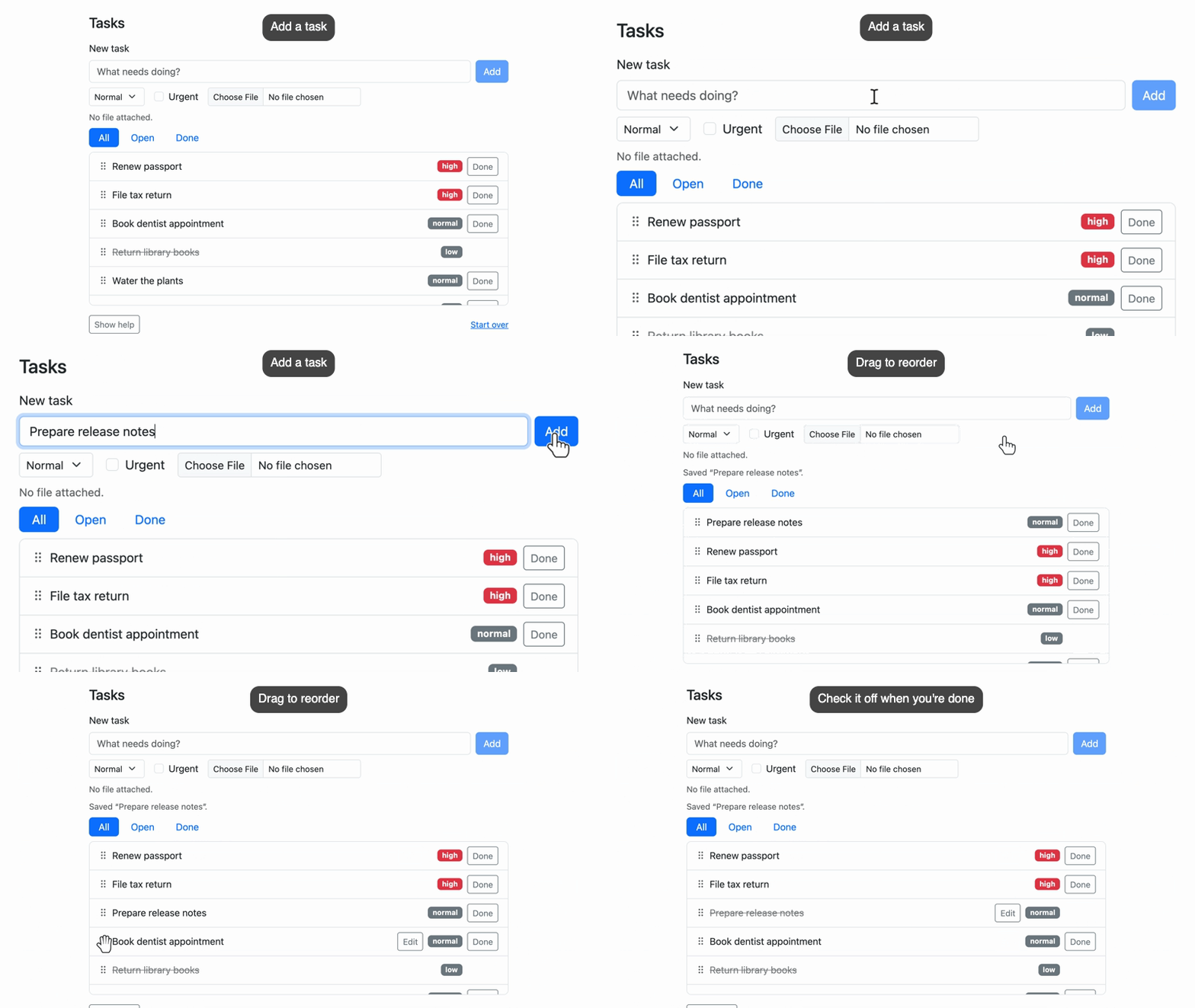
paparazzi opens a page in headless Chrome and works through your R script one step at a time: click this button, type into that field, move the camera to the form, show a caption. While it records, paparazzi moves the cursor and types text at the pace a person would, then saves the video as an MP4, WebM, or GIF.
Your script is the source of the demo, so when your app or document changes you can run it again to get the same demo of the new version. paparazzi works with any page Chrome can open, including Shiny apps, Quarto documents and slides, pkgdown sites, and live websites.
paparazzi does more than record. You can use the same functions and syntax to take product screenshots with framing and annotations, or to write front-end tests in testthat. In a test, paparazzi waits for each action’s target and retries each expectation until the page catches up.
You can install the development version of paparazzi from GitHub:
# install.packages("pak")
# pak::pak("posit-dev/paparazzi")
install.packages("paparazzi", repos = c('https://posit-dev.r-universe.dev', 'https://cloud.r-project.org'))
paparazzi controls Chrome (or another Chromium-based browser) through
chromote, so you’ll need one
installed. If chromote can’t find it, see ?chromote::find_chrome.
paparazzi routes each recording to the encoder that suits it best: MP4 and WebM videos go to the av package, GIFs to gifski. Both are suggested dependencies, and paparazzi checks for them only when a recording needs them. Simple GIFs need only gifski, but two features call in extra packages: cropping a GIF to a framed region of the page needs png, and camera movement or burned-in captions need av to composite the frames.
paparazzi includes an agent skill that teaches coding agents how to write paparazzi scripts. You can give your agent that skill in one of three ways:
Install the skill into your project with skills or the btw CLI:
npx skills add posit-dev/paparazzi
btw skills install posit-dev/paparazzi
Ask your agent to read
vignette("agents", package = "paparazzi").
btw is the easy way to give your
agent R documentation, through an MCP
server or the
btw
CLI
(btw docs vignette paparazzi -n agents).
Ask your agent to read https://posit-dev.github.io/paparazzi/articles/agents.md. This is the same skill, published as a Markdown page on the paparazzi website.
Here’s the whole script for the video at the top of this page. It records a small task-tracker page that ships with paparazzi:
library(paparazzi)

page <- pz_open(
  pz_example("tasks"),
  width = 1000,
  height = 720,
  color_scheme = "light"
)

task_release <- pz_loc(".task", has_text = "Prepare release notes")
task_dentist <- pz_loc(".task", has_text = "Book dentist appointment")

page |>
  pz_stage(enter = "bottom", pause = 0.3) |>
  pz_stage_annotate(caption_side = "top") |>
  pz_record_start(
    frame = pz_frame(list("h1", ".task-list"), pad = 24, ratio = 16 / 9),
    format = "gif",
    scale = 800
  ) |>
  pz_annotate_caption("Add a task") |>
  pz_camera("#new_task", wait = TRUE) |>
  pz_act_type("Prepare release notes", target = "#task_title") |>
  pz_act_click("#add_task") |>
  pz_expect_visible(task_release) |>
  pz_annotate(task_release, type = "box", pad = 4, id = "new") |>
  pz_annotate_caption("New tasks go to the top of the list") |>
  pz_record_hold(1.2) |>
  pz_camera_reset() |>
  pz_annotate_clear(id = "new") |>
  pz_annotate_caption("Drag to reorder") |>
  pz_act_drag(
    pz_loc(".task-drag-handle", within = task_release),
    to = pz_loc(".task-drag-handle", within = task_dentist)
  ) |>
  pz_record_hold(1) |>
  pz_annotate_caption("Check it off when you're done") |>
  pz_find(task_release) |>
  pz_act_click(".task-done") |>
  pz_expect_class("done") |>
  pz_cursor_leave() |>
  pz_record_hold(1)

pz_close(page)
pz_open() opens the page at the size you want to record. At the top of
the pipeline, pz_stage() sets defaults for the recording: the cursor
enters from the bottom, and paparazzi pauses for a moment after each
action so viewers can follow. pz_stage_annotate() tells paparazzi to
place captions at the top.
pz_record_start() starts the recording, and pz_close() stops it and
writes the file. The frame is the part of the page the video shows:
the task card, from its heading to the bottom of the list, padded and
widened to 16:9. With format and scale, you ask for an
800-pixel-wide GIF, small enough for a README.
Between those two calls, each line is one step, and the steps fall into three groups:
Acting on the page. pz_act_type() clicks the title field and
types into it, pz_act_click() presses a button, and pz_act_drag()
moves the new task to a new place in the list.
Several steps use the same two tasks, so before the pipeline, we
describe them once with pz_loc(): task_release is the task we’re
about to add, and task_dentist is the one we’ll drag it onto.
paparazzi doesn’t look for a pz_loc() element until a step uses it,
and it looks again each time, so you can describe an element before it
exists, like the new task here. Later, pz_find() scopes the next
steps to the new task, so paparazzi looks for ".task-done" only
inside it and clicks that task’s Done button.
Directing the recording. pz_camera() zooms in on the form and
pz_camera_reset() pulls back out. pz_annotate() outlines the new
task, pz_annotate_clear() removes the outline, and
pz_annotate_caption() changes the caption. pz_record_hold() holds
the frame so viewers have a moment to read, and pz_cursor_leave()
moves the cursor out of the shot at the end.
Waiting for the page. pz_expect_visible() waits for the page to
show the new task before pz_annotate() outlines it, and
pz_expect_class() waits for the page to mark the task done. Because
paparazzi waits for the page instead of guessing at timing, your
scripted demo stays in step with the real page. paparazzi keeps
recording while it waits, so if a step takes longer than you’d like
viewers to watch, you can cut it out with pz_record_pause() and
pz_record_resume().
The demo above covers the basics: acting on the page, moving the camera, annotating, and captioning. paparazzi can also:
pz_annotate_callout()) and spotlights that dim everything else
(pz_annotate_spotlight()) lead your viewer’s eye to the part of the
page you’re talking about. In a recording, paparazzi animates
annotations in and keeps them on their elements as the page scrolls or
changes.pz_stage() sets the cursor’s speed and size, the typing
speed, and the pause after each step, pz_stage_annotate() sets how
annotations look, and pz_stage_frame() sets the default framing.
Assign the staged page (page <- page |> pz_stage(...)) and every
chain that starts from it uses the same defaults.pz_frame(), you choose exactly
what a video or screenshot shows: crop to one or more elements, add
padding, and set an aspect ratio, like 16:9 for slides or 9:16 for a
vertical video.pz_act_press(), paparazzi can show them in the recording as
on-screen keycaps.pz_stage_fonts() loads fonts from Google
Fonts, Bunny Fonts, or a file for captions, callouts, and badges.pz_annotate_redact() before you start recording, and it stays hidden
from the very first frame.pz_device() gives you
one place to configure the browser: screen size, phone emulation, dark
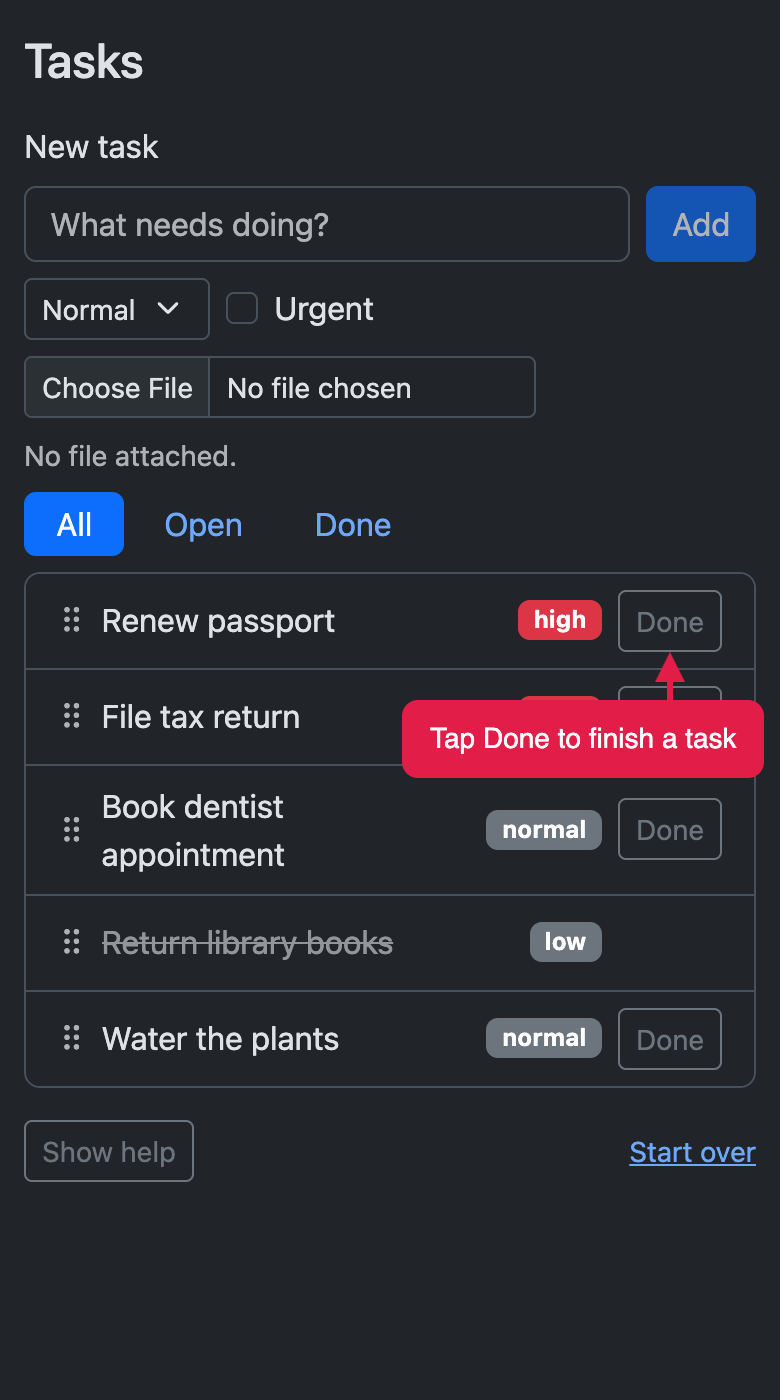
mode, zoom, reduced motion, locale, and time zone.You can use the same annotations, framing, and devices in screenshots. Here’s the task tracker on a phone in dark mode, with a callout:
|
|
You can also run paparazzi right inside an R Markdown or Quarto
document. Put your script in a code chunk, leave out the file path, and
end the chunk with pz_screenshot() or with the call that ends a
recording, like pz_record() or pz_record_stop(). paparazzi saves the
image or video with the document’s other figures and shows it right
where the chunk is. When your app or document changes, render again and
paparazzi takes fresh screenshots and records new videos.
Give pz_open() the path to a Shiny app, and paparazzi runs the app in
a background R process, opens it, and waits until it’s ready. When you
close the page, paparazzi stops the app. In between, you use the same
functions you would on any other page:
app <- pz_open(pz_example("tasks-app"))

app |>
  pz_set_shiny_input("priority", "high") |>
  pz_set_value("Buy milk", target = "#title") |>
  pz_act_click("#add") |>
  pz_expect_text("3 tasks", target = "#summary")

pz_close(app)
The one Shiny-specific function in that example is
pz_set_shiny_input(). It sets an input the way Shiny sees it, so even
selectize inputs and sliders update on the page and the server responds.
Everything else works just as it does on any other page, so you can
record a demo of your app, take screenshots, or write browser tests with
what you already know.
You can write browser tests with the same functions you use to record a demo. paparazzi animates the cursor and typing only while it records, so outside a recording your steps run at full speed.
Browser tests are tricky because the page keeps changing as you use it. When you click a button, the page might fetch data, re-render a list, or start an animation, and you rarely know how long that will take. If your test checks too early, it fails for no reason; if it sleeps for a fixed time, it’s slow and probably still flaky.
paparazzi handles the waiting for you. You state what should happen,
and paparazzi waits until it does or stops if it doesn’t. Before
pz_act_click() clicks on an element, paparazzi waits for that element
to be ready. An expectation like pz_expect_text() retries until the
page shows what you expect, or times out with an error that says what it
last saw.
paparazzi also works inside testthat, with the same syntax. testthat
counts each paparazzi expectation as a test expectation, and
pz_local_page() closes the page, and stops its app, when the test
ends:
test_that("adding a task updates the summary", {
  page <- pz_local_page(pz_example("tasks-app"))

  page |>
    pz_set_value("Buy milk", target = "#title") |>
    pz_act_click("#add") |>
    pz_expect_text("3 tasks", target = "#summary")
})
If you’re testing a Shiny app, you might also consider shinytest2. Pick the tool by what you want to check: